Verwandte Artikel
Screaming Bee Software
MorphVOX Pro - Voice Changer
Stimmenpakete für MorphVOX Pro
Soundeffekte
Umgebungshintergründe für MorphVOX Pro
MorphVOX Pro Plug-Ins
ScriptVOX Voice Packs
Support
User Interface Overview
Main Interface
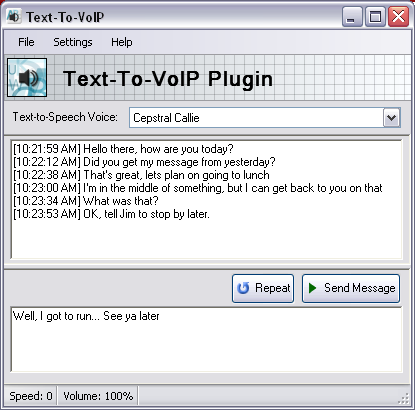
The Text-To-VoIP Plug-In has a intuitive user interface that allows you to pick a text-to-speech voice, enter text that you would like to have spoken.
Text-To-Speech Voice Selector
Choose the text-to-speech voice which you would like to speek with.
Text Output Window
Shows the text which has been sent by the Text-To-VoIP plug-in. This is also timestamped for your reference.
Repeat Button
This re-broadcasts the last message that was last sent.
Send Message Button
This sends a message from the text entry window using the chosen text-to-speech voice.
Text Entry Window
The place where you can type a message to be sent.
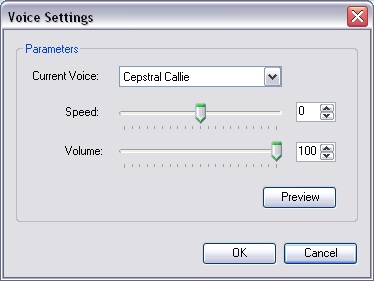
Voice Settings
This dialog allows you to adjust the speed and volume of the text-to-speech voices.
Current Voice
Choose the text-to-speech voice. This choice is for purpose of previewing how the settings sound.
Speed Slider
Adjust the relative talking speed for the text-to-speech voices. This ranges from -10 to +10.
Volume Slider
Adjusts the volume of the text-to-speech voices, from 0 to 100%
Preview Button
Allows you to preview a text-to-speech voice with the given settings.
Menu Items
File
Exit
Closes the Text-To-VoIP Plug-in
Settings
Voice Settings...
Opens the Voice Settings Dialog which allows you to adjust speed and volume of a text-to-speech voice.
Pronunciation...
Opens the pronunciation manager dialog. This allows you to create rules for how the text-to-speech engine says words.
Repeat last phrase
Repeats the last phrase or sentence that was spoken.
Help
About...
Information about this plug-in.
Purchase...
Launches your web browser to the page to purchase this plug-in. This item is only visible when running in trial mode.
Help...
Launches your web browser to a page for help on using this plug-in.
Click to Go Back
Zulassen
Diese Website verwendet Cookies und ähnliche Technologien, um die Funktionalität der Website bereitzustellen, den Verkehr und die Nutzung zu analysieren und auf Ihre Interessen zugeschnittene Inhalte bereitzustellen.
Mehr